
How to Submit a Skin Design for Review in CS2 Successfully
Creating a custom weapon finish is one thing. Getting it noticed by the Counter-Strike 2 community is another. If you want to submit a skin design for review, you need more than an eye-catching texture. Your files, presentation, and Steam Workshop listing all matter. Here's how to prepare your CS2 skin, publish it correctly, and give your creation a better chance of standing out.
How to Submit a CS2 Skin Design: Quick Overview
To submit a custom CS2 weapon skin, creators generally prepare their artwork using Valve's supported tools, test the finish on the intended weapon model, and publish their submission through the Steam Workshop. Other players can then discover, discuss, and rate the design.
|
Step |
What You Need to Do |
|---|---|
|
1. Check the guidelines |
Review Valve's Workshop requirements |
|
2. Finalize the design |
Test textures, colors, and weapon coverage |
|
3. Prepare preview images |
Show the skin from multiple angles |
|
4. Write a description |
Explain the concept and design details |
|
5. Submit through Workshop |
Upload the required files and publish |
|
6. Collect feedback |
Monitor comments and refine the design |
|
7. Promote your work |
Share the Workshop page with the community |
Important: Publishing a skin in the Steam Workshop does not mean Valve has approved it for inclusion in CS2. Workshop publication and official in-game selection are separate processes.
1. Understand the CS2 Skin Submission Guidelines
Before opening Photoshop or Blender, spend some time studying Valve's official documentation.
CS2 weapon finishes follow specific technical requirements. Unlike a standard digital illustration, a Workshop skin must work with the game's weapon models, materials, and rendering system.
Start with these resources:
-
Counter-Strike 2 Workshop Resources
-
Steam Workshop
Pay particular attention to texture requirements, supported finish styles, material settings, and intellectual property restrictions.
What Should You Check Before Submission?
Your design should meet several basic requirements:
-
Original artwork: Create your own textures and visual elements rather than copying another artist's work.
-
Correct weapon model: Make sure the design fits the weapon you selected.
-
Compatible files: Follow the formats and technical specifications supported by Valve's current tools.
-
Proper texture alignment: Avoid misplaced graphics, visible seams, and unintended distortion.
-
Content compliance: Check the applicable rules for prohibited imagery, trademarks, and copyrighted material.
A great-looking concept can still run into problems if the underlying files aren't prepared correctly.
Pro tip: Keep your original project files, layered artwork, and exported textures organized. If you need to update the design, you'll save yourself a lot of unnecessary work.
2. Polish Your CS2 Skin Before Submitting It
A skin that looks incredible in a flat texture preview might look completely different when applied to an actual weapon.
That's why testing matters.
Inspect your finish using the available CS2 Workshop tools and pay attention to how the design behaves across the weapon's surfaces.
Focus on These Design Elements
Color consistency
Check whether your chosen palette works under different lighting conditions. Metallic surfaces, dark textures, and bright accents can behave differently depending on the material settings.
Texture alignment
Make sure important details aren't stretched, cut off, or hidden by the weapon's geometry.
Visual balance
A weapon skin doesn't need to cover every available surface with artwork. Sometimes a clean design with carefully placed accents looks better than an overloaded texture.
Finish behavior
Understand how the selected finish style handles patterns, materials, and wear.
Learn From Existing CS2 Skins
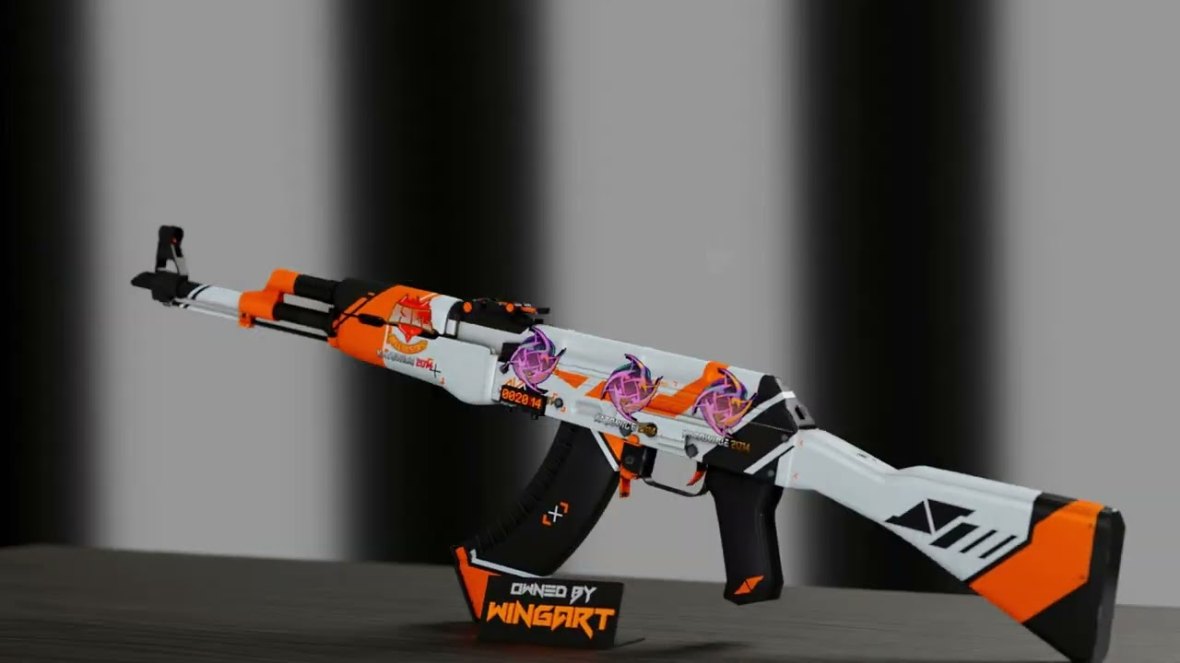
AK-47 | Asiimov
Its recognizable white, orange, and black design shows how a strong color palette and bold geometric shapes can create a memorable finish.
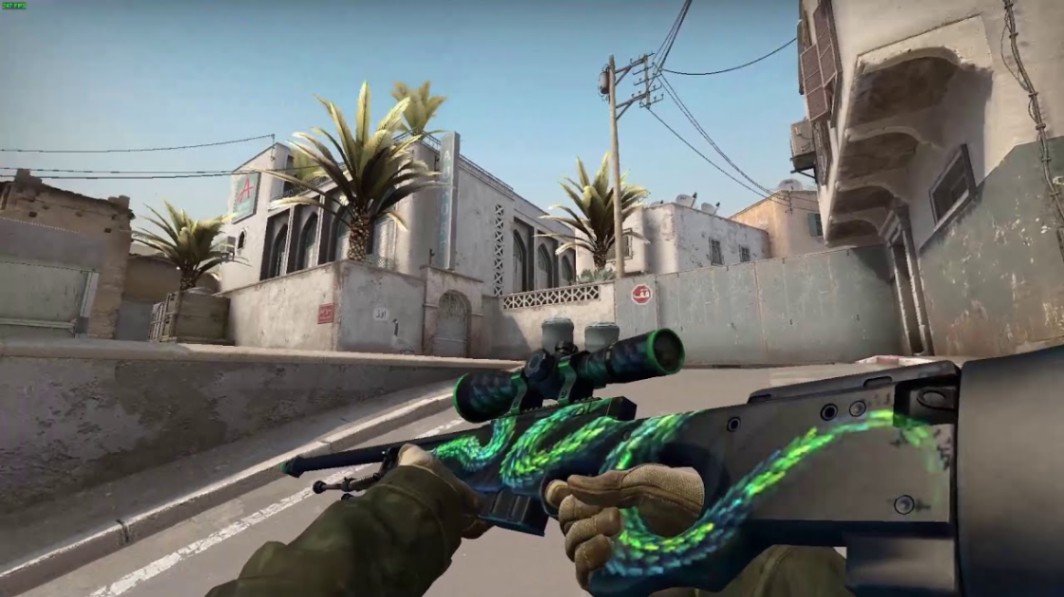
AWP | Atheris
The snake illustration demonstrates how detailed artwork can become the centerpiece of a weapon finish without overwhelming the entire model.
M4A4 | The Emperor
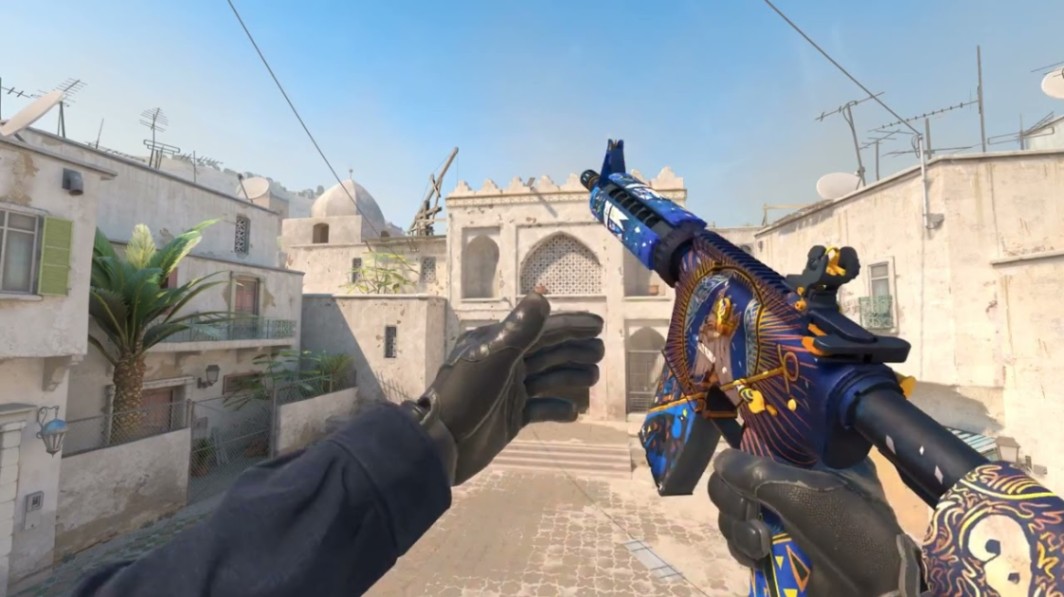
Its intricate blue-and-gold artwork is a useful reference for balancing decorative detail with a recognizable overall composition.
These are references for design principles, not templates to copy. Originality is essential when creating Workshop submissions.
3. Prepare Professional Preview Images
Your Workshop presentation is often the first thing another player sees.
Even an impressive skin can get overlooked if the screenshots are blurry, poorly lit, or don't clearly show the weapon.
What Makes a Good Skin Preview?
Include several useful views of your design:
-
Full weapon view: Show the entire skin with all major visual elements visible.
-
Close-up details: Highlight intricate patterns, artwork, or material effects.
-
Alternative angles: Show how the finish wraps around the weapon model.
-
In-game perspective: Demonstrate how the skin looks when held by a player.
-
Wear examples: If applicable, show how different wear levels affect the appearance.
For example, a design might look clean in Factory New condition but lose important details at higher wear values.
The standard CS2 wear categories are:
|
Wear Category |
Float Range |
|---|---|
|
Factory New (FN) |
0.00–0.07 |
|
Minimal Wear (MW) |
0.07–0.15 |
|
Field-Tested (FT) |
0.15–0.38 |
|
Well-Worn (WW) |
0.38–0.45 |
|
Battle-Scarred (BS) |
0.45–1.00 |
These are the standard category boundaries. Individual skins can have restricted float ranges, and the visual effects of wear depend on the finish.
Remember that Workshop designs are not automatically available in every wear category.
4. Write a Description That Explains Your Design
Visuals attract attention, but a good description helps players understand what makes your skin different.
You don't need a dramatic backstory or a wall of text. Explain the concept clearly.
What to Include in Your Workshop Description
A useful description covers the design's name, inspiration, artistic approach, standout details, and any relevant information about the finish.
For example, imagine you've created an original AK-47 skin inspired by futuristic industrial machinery.
Your description could explain that the artwork combines dark metallic surfaces with illuminated mechanical elements, using carefully positioned accents to highlight the weapon's shape.
Keep the language natural.
Avoid exaggerated claims such as calling your creation the best skin ever made. Let the artwork speak for itself.
Choose a Memorable Name
A good skin name should be easy to remember and connected to the artwork.
Short, distinctive names usually work better than complicated titles packed with unnecessary keywords.
Before settling on a name, search existing Workshop submissions and official CS2 finishes to avoid obvious duplication.
5. Submit a Skin Design for Review Through Steam Workshop
Once your files and presentation are ready, it's time to publish your work.
The exact interface and available settings may change as Valve updates its tools, so always follow the current Workshop instructions.
Step-by-Step Submission Process
-
Open the CS2 Workshop tools. Access the supported creation and publishing tools through your Steam installation.
-
Load your finished design. Import the required textures and configure the appropriate finish settings.
-
Check the weapon preview. Verify that the artwork appears correctly on the intended model.
-
Prepare your Workshop listing. Add a clear title, description, and required preview assets.
-
Review the submission settings. Confirm that the files, visibility options, and other required details are correct.
-
Publish the item. Follow the publishing workflow and verify that your Workshop page is accessible.
After publication, inspect the live listing.
Check that your screenshots load correctly, your description is readable, and the design appears as intended.
6. Understand How the CS2 Skin Review Process Works
One of the biggest misconceptions among new creators is that publishing a Workshop skin automatically places it in a formal approval queue with a guaranteed decision.
That's not how the system should be understood.
The Steam Workshop gives creators a place to publish their work and receive community feedback. Valve separately decides which designs, if any, to select for official CS2 content.
Community Feedback vs. Official Selection
|
Community Workshop |
Official CS2 Selection |
|---|---|
|
Players can discover submissions |
Valve chooses designs for potential inclusion |
|
Users can rate and comment |
Valve controls official selection |
|
Creators can receive public feedback |
Selection is not guaranteed |
|
Designs can gain visibility |
Selected artwork may appear in official content |
|
Publication doesn't guarantee acceptance |
Additional requirements may apply |
A popular Workshop submission is not automatically guaranteed a place in a future case or collection.
Likewise, a design that receives limited attention isn't necessarily a poor-quality creation.
Valve's internal selection decisions are not fully transparent, so avoid treating community votes as a predictable approval formula.
7. Handle Feedback Without Losing Your Original Vision
Not every comment will be useful.
Some players might love your artwork. Others may dislike the color scheme or suggest changes that don't fit your concept.
The trick is knowing which feedback deserves attention.
Useful Feedback to Look For
Focus on comments that identify specific problems:
-
Important artwork becomes distorted around the magazine.
-
The finish looks too dark in certain lighting.
-
Small details are difficult to recognize during gameplay.
-
The colors clash with the weapon's geometry.
-
Certain surfaces look unfinished.
These observations can help you improve the design.
Generic comments like "bad skin" or "make it cooler" aren't particularly actionable.
Pro tip: When several players independently identify the same issue, investigate it. Repeated technical criticism is often more valuable than a simple rating.
8. Promote Your CS2 Workshop Skin
Publishing your skin is only part of the process.
If nobody sees the Workshop page, collecting meaningful feedback becomes much harder.
You can share your creation through relevant Counter-Strike communities, social media, and creator-focused spaces.
Where to Share Your Design
Steam Workshop community
Engage with other creators, review their work, and participate in genuine discussions about design.
Relevant Counter-Strike communities can be useful for gathering opinions, provided your posts follow their self-promotion rules.
YouTube and TikTok
Short videos showing the design process, texture details, or in-game previews can help explain what makes your finish interesting.
Discord communities
Artist and CS2-focused servers may offer more detailed technical feedback than public comment sections.
Avoid spamming your Workshop link or asking for artificial engagement.
A thoughtful presentation and genuine community interaction are more valuable than inflated attention.
9. Common CS2 Skin Submission Mistakes
Even experienced creators occasionally overlook important details.
Here are some common problems worth checking before publication.
|
Mistake |
Why It Matters |
Better Approach |
|---|---|---|
|
Ignoring technical guidelines |
Files may not work correctly |
Check Valve's documentation |
|
Using copyrighted artwork |
Can create intellectual property problems |
Develop original designs |
|
Poor screenshots |
Makes details harder to evaluate |
Capture clear weapon previews |
|
Overcomplicated textures |
Reduces visual readability |
Focus on strong composition |
|
Skipping wear testing |
May hide unwanted visual changes |
Inspect supported wear behavior |
|
Weak descriptions |
Gives viewers little context |
Explain the design concept |
|
Expecting guaranteed selection |
Creates unrealistic expectations |
Treat Workshop publication as a separate milestone |
Another mistake is trying to imitate an already successful skin too closely.
You can learn from popular designs without copying their artwork.
10. What Happens If Valve Selects Your Skin?
Official selection is an exciting possibility, but it isn't something creators can count on.
If Valve chooses a Workshop design, the creator may need to complete additional steps connected to the applicable submission terms, rights, and production requirements.
Valve determines how and when selected artwork appears in the game.
Creators should review the current legal and contributor terms before submitting, especially if they work with collaborators or use third-party assets.
Does Getting Selected Mean You'll Earn Money?
Valve has established contributor arrangements for selected Workshop content, but compensation depends on the applicable program and terms.
Don't assume that every published Workshop item generates revenue.
For creators interested in the commercial side of CS2 cosmetics, understanding ownership rights and official contribution agreements is just as important as producing strong artwork.
11. Build a Portfolio Beyond a Single Submission
Your first Workshop design doesn't need to become an official CS2 skin to be worthwhile.
Every project gives you another opportunity to improve your workflow, understand weapon geometry, and develop a recognizable artistic style.
Consider building a small collection of related designs.
For example, you could create a series of finishes built around cyberpunk machinery, ancient mythology, or minimalist tactical aesthetics.
A consistent visual identity can help players recognize your work.
Keep track of your finished projects, document major revisions, and maintain a portfolio that demonstrates your progress.
You can also explore [Placeholder: How to Become a CS2 Skin Designer → URL] and [Placeholder: How to Join the CS2 Skin Designer Community → URL] for related creator-focused resources.
Key Takeaways
-
Follow Valve's requirements. Correct files, original artwork, and supported materials are essential.
-
Test the skin thoroughly. Check texture alignment, lighting, and wear behavior before publishing.
-
Create strong previews. Clear screenshots help players evaluate your artwork.
-
Explain your concept. A concise Workshop description makes your design easier to understand.
-
Use community feedback. Specific criticism can help improve your next version.
-
Keep expectations realistic. Workshop publication doesn't guarantee official selection or compensation.
FAQ: Submitting CS2 Skin Designs
How do I submit a skin design for review in CS2?
Create an original weapon finish using Valve's supported CS2 Workshop tools, prepare the required files and previews, and publish the design through the Steam Workshop. Follow the current official documentation for the exact publishing steps.
Can anyone submit a CS2 skin design?
Steam users who meet the applicable Workshop requirements can create and publish eligible submissions. You don't need to be a professional artist, but your work must comply with Valve's technical and content rules.
How long does Valve take to review CS2 skins?
Valve does not provide a guaranteed selection timeline for every Workshop submission. A design can remain publicly available without being selected for official inclusion.
Do Steam Workshop votes guarantee that a skin will be added to CS2?
No. Community engagement can help a design gain attention, but Valve makes the final decisions about which skins enter official CS2 content.
Can I update my skin after publishing it?
Workshop creators can generally manage their published items, although the available update process depends on the relevant tools and submission status. Check the current publishing workflow before making changes.
Can I make money from a CS2 skin design?
Potentially. Selected Workshop contributors may be eligible for compensation under Valve's applicable agreements. Simply publishing a design does not guarantee payment.